Phishing Email Analysis
 May 25, 2023
 245
245
Phishing Email Analysis
What is Phishing Email Analysis?
Email is a must-have communication tool. We use it on a daily basis. Unfortunately, many attacks start with an email. Wouldn’t it be awesome if everyone was an email ninja? Don’t worry; by the end of this session, you should be pretty confident in your email analysis abilities.
“Phishing attack is a type of online attack mainly done to steal the personal data of the users by clicking on the malicious links sent via email or by running malicious files on the computer.”
A vigilant, trained, and aware human user is an important line of defence against both internal and external threats. Even if malicious URLs and emails pass through spam filters and anti-virus software, a human user can detect them. Such a defensive strategy is common in the design of secure systems. It also demonstrates Layering, a first principle of cyber security.
“Phishing email analysis involves studying the content of phishing emails to ascertain the techniques the attacker used.”
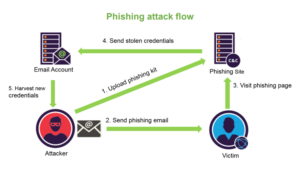
Which types of data/information are vulnerable to phishing attacks?
A phishing email attack : goal is to steal personal or financial information. To understand which data in your organisation is at risk, you must first understand why hackers want it. Attackers attempt to obtain information that will allow them to profit in some way. They can profit from your data in three ways:
1.Data theft for personal gain: Hackers can steal your money by using your personal or financial information. When they do this, however, they endanger their own lives. As a result, they will seek out high-value data or financial information that can be exploited with the least amount of risk to themselves.
2.Sell data: An attacker may steal your data and sell it to another party. This is frequently done on the dark web, where there are markets for stolen data. Your data could be included in a package containing sensitive information about other people. A hacker, for example, may sell a collection of 50 credit card numbers to someone else.
3.Obtain information for another entity: An organisation may pay a hacker to steal your information, cause an embarrassing breach, or provide cyber espionage services. A third party, such as the government or another company, may be involved at times. In this case, the hacker is assigned a task with specific goals and is compensated accordingly.
Elements of a Phishing email
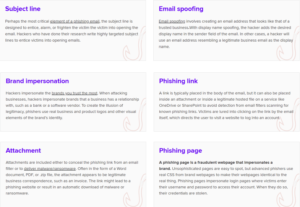
E-mail Traffic Analysis
Many parameters are required when you analyze a phishing attack. You can look at the size of the attack and the audience in the search results made on the mail gateway. Sender Address, Email Address Domain, SMTP IP Address may be constantly changing. In the results, it is required to learn the recipient addresses. If any malicious emails are constantly coming to the same users, then, might be their email addresses have leaked and shared on sites. It is recommended that this information should not be shared everywhere, as keeping mail addresses on sites is a potential attack vector for attackers.
What is an Email Header and How to Read Them?
Here, I will explain what the header information is? what should be done with this information? and how
to access this information. It is critical to follow this section carefully.
What is an Email Header?
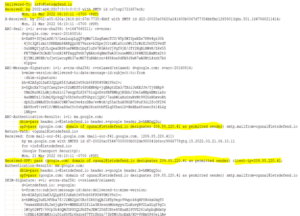
“Header” is a section of the mail that have data such as sender, recipient and date. Besides, there
are fields such as “Reply-To”, “Return-Path”, and “Received”. Below is the header details of a sample email.
What does the Email Header do?
A. Enables Shipper and Recipient Identification
The “From” and “To” fields in header part determines from where an email will go to whom. If we
look at the email in “eml” format, it was sent from the address
ogunal@letsdefend.io to info@letsdefend.io

B. Spam Blocker
It is possible to find spam e-mails by the Header analysis and other methods. This protects everyone from
receiving SPAM emails.
C. Allows Tracking an Email’s Route
It is critical to check the route to find if a mail came from the right address. In our example, it came from the ogunal@letsdefend.io address. However, is it true? if it acrually comes from letsdefend.io domain or from a another fake server ? We can use the header information to solve.
How to Access Your Email Header?
Gmail
1- Open the relevant e-mail
2- Click on the 3 dots at the top right “…”
3- Click on the “Download message” button.
4- Downloaded “. No open the file with the “eml” extension with any notebook application.
Outlook
1- Open the relevant e-mail
2- File – > Info -> Properties – > Internet headers
Get real-time lab access with SIEM XPERT’s Best SOC Analyst Course in India …..
Email Header Analysis
In this section, we will discuss about what we should do and what how should be the analysis process.
Questions to answer when checking headings in Phishing analysis:
- Is the mail sent from correct SMTP server?
- Is the data “From” & “Return-Path / Reply-To” same?
The e-mail examined in the rest of the article:
password: infected
Download Link: https://drive.google.com/file/d/1x4BQF9zdR2l913elSQtixb-kmi9Jan_6/view
A. Was the email sent from the correct SMTP server?
You can check the “Received” field for knowing the path followed by email. The mail is from the IP address server
“101[.]99.94.116” .

Normally, “letsdefend.io” should use, “101[.]99.94.116” to send email. To confirm it, you
can query the MX servers used by “letsdefend.io
“mxtoolbox.com” helps by displaying you the MX servers by the domain you searched.

From the image, “letsdefend.io” uses Google addresses as mail server. So there are no
relationships by emkei[.]cz or “101[.]99.94.116” addresses.
In this regard, it was proved that the mail didn’t come from original address, but was spoofed.
B. Is the data “From” & “Return-Path / Reply-To” same?
We expect that the sender and the receiver to be the same, except in some cases.
An example about why it is used differently in Phishing attacks:
Now, we will do the comparison of the email addresses in the “From” & “Reply-to” fields.

Here, the data is different. or I can say when you want to reply to this mail, you can reply to the gmail
address below. It is not the case, that the different data always suggest a phishing email. If there is a misleading content, harmful attachment, or URL, we can understand that it is the phishing e-mail.
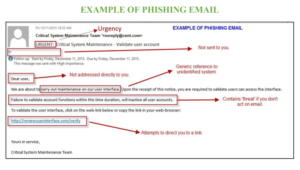
How to identify a phishing email
Phishing email analysis examples
1. Errors in Grammar and Spelling
Some hackers do not understand the language in which they are writing the email, as well as its basic grammatical conventions. When you receive an email from someone you are supposed to trust or from a professional organisation, the grammatical and spelling errors are either predictable or nonexistent. Someone you know at work, for example, may occasionally write I in lowercase when referring to themselves or use colloquial words such as “going to” or “want to.” These are frequently predictable aspects of your communication.
The errors in a phishing attack are frequently far more egregious, with mistakes such as:
- Incorrect spelling of the company’s name
- Misspelling your name—or even the name of the ostensible sender
- Rearranging key sentence elements, such as putting an adjective after a noun rather than before it
2. The domain name is spelled incorrectly.
Another clue can be found in domain names that indicate phishing scams – and it unfortunately complicates our previous clue.
The problem is that a domain name can be purchased from a registrar by anyone. And, while each domain name must be unique, there are numerous ways to generate addresses that are indistinguishable from the one being spoofed.
3. An Unusual Tone or Greeting
When reading a phishing message, the first thing that usually raises suspicion is that the language isn’t quite right – for example, a colleague is suddenly overly familiar, or a family member is a little more formal. For example, if I received an email from Cofense’s CTO that began with “Dear Scott,” it would immediately raise a red flag. He has never started an email with that greeting in all of our correspondence over the years, so it would feel awkward. If a message appears odd, look for other signs that it could be a phishing email.
4. Unusual Attachments
If the recipient receives an email with an attached file from an unknown sender, or if the recipient did not request or expect to receive a file from the sender of the email, the file should be opened with caution. If the attached file has an extension commonly associated with malware downloads (.zip,.exe,.scr, etc.) – or if the extension is unfamiliar – recipients should flag the file for virus scanning before opening.
5. Request for Credentials, Payment Details, or Other Personal Information
One of the most sophisticated types of phishing emails occurs when an attacker creates a bogus landing page to which recipients are directed via a link in an official-looking email. The bogus landing page will have a login box or will request payment to resolve an outstanding issue. If the email was unexpected, recipients should visit the website from which the email allegedly came by typing in the URL – rather than clicking on a link – to avoid entering their login credentials for the fake site or paying the attacker.
6. Emails requesting login information
Any email requesting personal information should be regarded as suspicious. In many phishing emails, the information requested is something they should already have, such as contact information you’ve provided in the past.
Companies have also decided not to request login information for payment data via email, owing to the fact that this helps prevent phishing attacks. If you receive an email that appears to be legitimate but requests personal or sensitive information, it is best to contact the company directly by composing a new email with the appropriate address rather than responding to the one you were sent.
7. Brief and to the point
While many phishing emails will be stuffed with details designed to provide a false sense of security, some phishing messages will be sparse in information in order to capitalize on their ambiguity. For example, a scammer may spoof an email from Jane at a company that is a preferred vendor, sending the email once or twice a week with the vague message ‘here’s what you requested’ and an attachment titled ‘additional information’ in the hopes of getting lucky.
DEFENSIVE PROTECTIVE MEASURES
Following are some of the defensive measures to consider for preventing phishing email attacks:
- Email scanning and filtering
- Email security gateways
- DNS authentication (DMARC, DKIM, and SPF)
- Anti-malware and anti-spam
- Multi-factor authentication (MFA)
- Phishing security awareness
read our blog on Log4j Vulnerability…….